Free MikroTik Hotspot Login Page Builder
Free · No Registration · No Coding
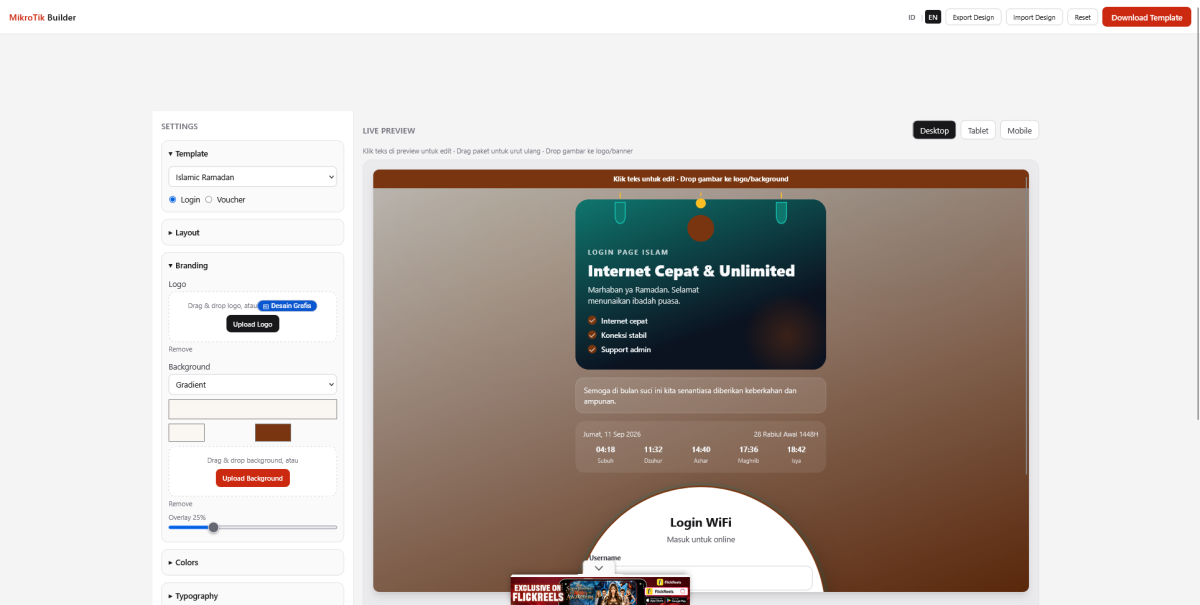
Create a professional MikroTik hotspot login page without writing code. Our free MikroTik Hotspot Login Page Builder lets you design, customize, preview, and download a ready-to-use hotspot login page for your MikroTik router.
Whether you manage a café, restaurant, hotel, school, office, public WiFi, or internet business, you can create a custom MikroTik captive portal in just a few steps.
What Is a MikroTik Hotspot Login Page Builder?
A MikroTik Hotspot Login Page Builder is an online tool that helps you create custom login pages for MikroTik Hotspot without manually editing HTML, CSS, or JavaScript files.
Instead of starting from an empty template, you can choose a layout, customize the design, add your logo and background, configure the login form, and preview the result before downloading it.
The generated files can then be uploaded directly to your MikroTik Hotspot server.
Create a MikroTik Hotspot Login Page for Free
You don't need to create an account or install software.
The builder is available online and can be used for free:
-
No registration required
-
No coding required
-
Live preview
-
Custom logo and background
-
Custom colors and content
-
Multiple login page layouts
-
Username and password login
-
Voucher login page support
-
Ready-to-download MikroTik hotspot files
-
Indonesian and English interface
This makes it useful for both beginners and experienced MikroTik administrators.
How to Create a MikroTik Hotspot Login Page
Creating a custom hotspot login page is simple.
1. Choose a Login Page Layout
Start by selecting a layout that fits your WiFi service.
You can create different styles, including:
-
Centered login form
-
Full-screen background
-
Login card
-
Split-screen layout
-
Form on the left
-
Form on the right
Choose a layout that matches your business or WiFi environment.
2. Customize Your Design
Add your own branding and change the appearance of the login page.
You can customize elements such as:
-
Logo
-
Background image
-
Primary colors
-
Text
-
Login form
-
Buttons
-
Welcome message
-
Terms and information
For businesses, adding a logo and branded colors can make the captive portal look much more professional.
3. Preview Your Hotspot Login Page
Use the live preview to see how the page looks before downloading it.
You can make changes and immediately check the result without repeatedly uploading files to your MikroTik router.
4. Download the MikroTik Hotspot Files
When your design is ready, download the generated files and upload them to your MikroTik Hotspot directory.
The exported package is designed to make deployment easier for MikroTik Hotspot users.
Username and Password Login
The builder supports a traditional MikroTik Hotspot username and password login page.
This is suitable for networks where users receive individual accounts or credentials before accessing the internet.
You can customize the login form while keeping it suitable for the MikroTik Hotspot authentication system.
MikroTik Voucher Login Page
You can also create a hotspot login page designed for voucher-based WiFi access.
Voucher login is commonly used by:
-
Cafés
-
Restaurants
-
Hotels
-
Guest houses
-
Internet cafés
-
Public WiFi providers
-
Beach clubs
-
Small businesses
You can display voucher products and connect your page to an external ordering or voucher system.
Why Use a Custom MikroTik Captive Portal?
The default MikroTik Hotspot page works, but a customized captive portal can provide a better experience for your users.
A branded login page can help you:
Improve Your Brand
Display your business logo, colors, and messaging directly on the WiFi login page.
Create a Better User Experience
A clean and responsive interface makes it easier for customers to understand how to connect to your WiFi.
Promote Your Business
Use the captive portal to display promotions, announcements, contact information, or other important messages.
Make Your WiFi Look Professional
A custom captive portal can make a standard MikroTik Hotspot network feel more like a professional WiFi service.
Free MikroTik Hotspot Templates
If you don't want to design everything from scratch, you can start with a pre-built template.
Templates can help you create a professional-looking MikroTik hotspot login page faster.
Choose a template, customize the content and branding, preview the result, and download the final files.
Who Can Use This Tool?
The MikroTik Hotspot Login Page Builder is designed for anyone who needs a custom MikroTik captive portal.
It can be used by:
-
MikroTik administrators
-
Network engineers
-
WiFi providers
-
Café owners
-
Restaurant owners
-
Hotel and guest house operators
-
Schools and campuses
-
Office networks
-
Public WiFi operators
-
Internet businesses
-
Web developers
You don't need advanced HTML or CSS knowledge to get started.
No Coding Required
You don't have to manually edit MikroTik hotspot files.
The builder handles the design process through a visual interface, allowing you to focus on the appearance and content of your login page.
This is especially useful if you want to create a professional hotspot portal but don't have experience with HTML, CSS, or web development.
Designed for MikroTik Hotspot
The generated pages are intended for use with MikroTik Hotspot and captive portal networks.
You can create a page for your existing MikroTik Hotspot configuration and customize the design without changing the core purpose of the authentication page.
The builder focuses on the front-end login experience while your MikroTik router continues to handle hotspot authentication and network access.
Build Your MikroTik Hotspot Login Page Online
You can start creating your own hotspot page directly from your browser.
No account. No registration. No coding.
Create a professional MikroTik captive portal, customize it with your branding, preview the design, and download the files for your MikroTik Hotspot.
Frequently Asked Questions
Is the MikroTik Hotspot Login Page Builder free?
Yes. The builder is free to use and does not require registration.
Do I need coding knowledge?
No. You can create and customize the login page using the visual builder without manually writing HTML or CSS.
Does it work with MikroTik Hotspot?
Yes. The generated login page is designed for use with MikroTik Hotspot captive portal environments.
Can I add my own logo?
Yes. You can upload your own logo and use it on your hotspot login page.
Can I use my own background image?
Yes. The builder allows you to customize the background and other visual elements.
Can I create a voucher login page?
Yes. You can create a login page suitable for voucher-based WiFi systems and display voucher products or an external ordering URL.
Do I need to create an account?
No. No registration is required.
Can I download the finished hotspot page?
Yes. You can export your completed design and download the files for use with your MikroTik Hotspot.
Start Creating Your Free MikroTik Hotspot Login Page
Create a better captive portal for your MikroTik network without coding.
Free to use. No registration required.