Articles
17 December 2019
How to Set Up a Mikrotik Hotspot So It Doesn't Ask You to Login Frequently
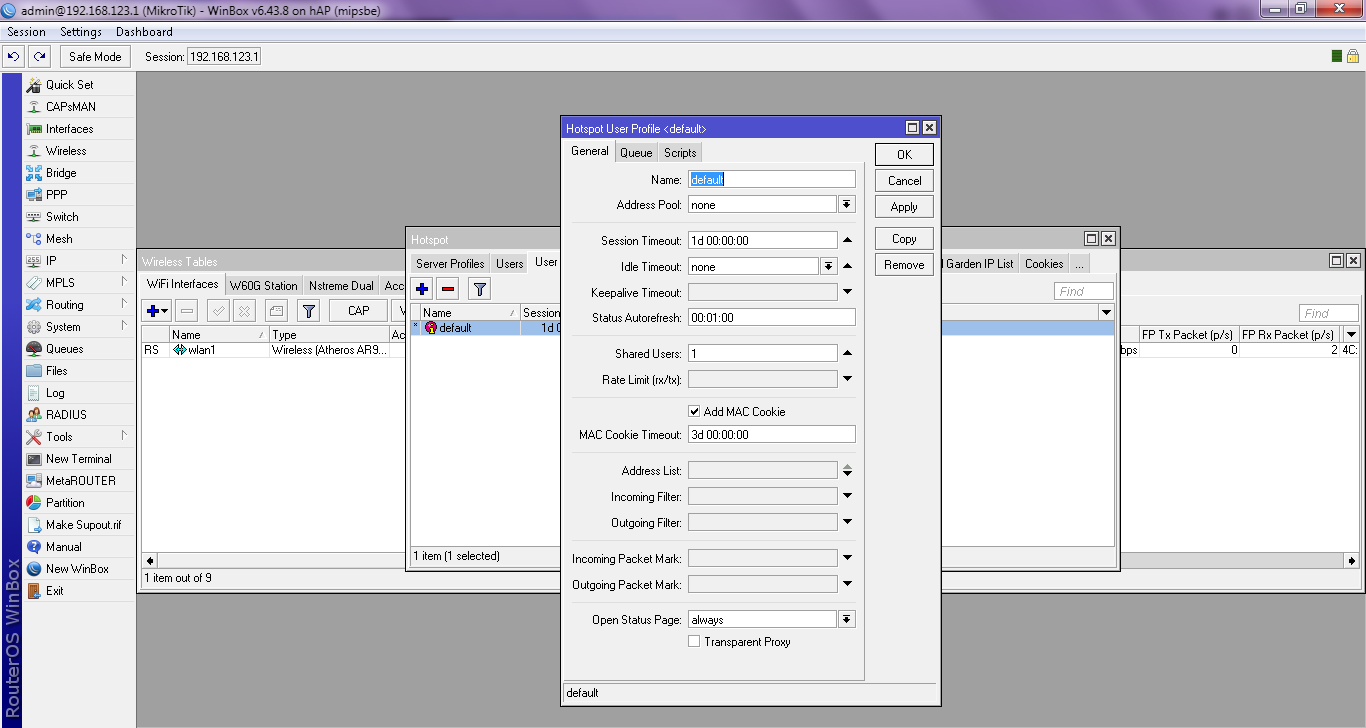
How to Set Up a Mikrotik Hotspot So It Doesn't Ask for Login Often - in the previous article we have discussed Optimize Wifi network on Mikrotik and it has also been discussed in that article about setting up a Mikrotik hotspot so it doesn't ask for login often, this is because usually when setting it up you just follow the default settings from the Mikrotik hotspot setup wizard, for that How to Set Up a Mikrotik Hotspot So It Doesn't Ask for Login Often is very easy as follows
- Access the router via Winbox
- Open IP -> Hotspot -> User Profiles
- Open the user profile you want to edit by double-clicking it.
- In the Session Timeout section, enter the length of time the user will remain connected and not disconnected from Wi-Fi.
- Set Idle Timeout to none.
- Set keepalive timeout to blank/none.
- Click OK.
Now your hotspot user will not be disconnected according to the session timeout you entered earlier. It's very easy, isn't it? How to S